
TL;DR
Four cards sit at the top of Search Performance: a parent total (Unique URLs analyzed) and three groups underneath it (Crawled with impressions, Crawled no impressions, Not Prerender.io-served with impressions). Every analyzed URL lands in exactly one of the three groups, and they always add up to the parent, so you can reconcile the numbers yourself. Each group card is clickable, select it to jump into the Pages tab filtered to that group.
For the full picture of how Search Performance ties your crawl data to Google Search, see Understanding Search Performance in your Prerender.io dashboard.
What are the differences between each Search Performance KPI?
The KPI cards compare URLs observed through Prerender.io with URLs reported in Google Search Console (GSC) during the reporting period. Prerender.io normalizes and deduplicates URLs before calculating the metrics, so each URL is counted once.
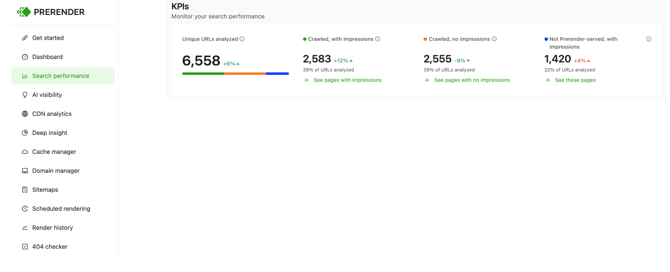
Unique URLs analyzed
The total number of unique URLs observed during the reporting period, combining:
- URLs Googlebot requested and Prerender.io served, regardless of whether GSC recorded impressions for them, and
- URLs for which Google Search Console recorded at least one impression.
This is the total population used for the three KPI groups below. In plain terms, it's every URL Prerender.io served plus every URL GSC reported impressions for, combined and counted once.
Calculation: Prerender.io-served URLs ∪ URLs with GSC impressions
Crawled, with impressions
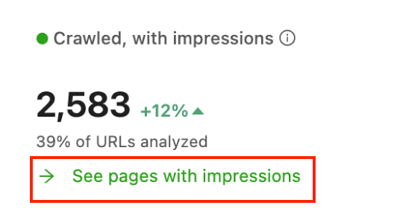
Unique URLs that were requested by Googlebot and served through Prerender.io during the reporting period, and that received at least one impression in Google Search Console during the same period. This is the overlap between Prerender.io-served URLs and URLs with recorded GSC impressions.
Calculation: Prerender.io-served URLs ∩ URLs with GSC impressions
Each card shows the group's share of Unique URLs analyzed as a percentage. Select See pages with impressions to open the With impressions tab in Pages, where you can see the URLs along with their impressions, clicks, and CTR. For the full breakdown of that tab, see Understanding the Pages tab in Search Performance.
Crawled, no impressions
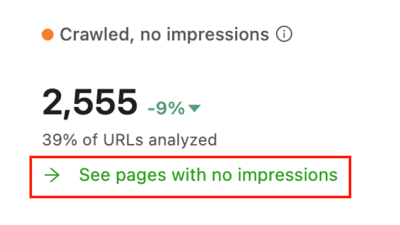
Unique URLs requested by Googlebot and served through Prerender.io during the reporting period, for which no impressions were recorded in the synchronized GSC Search Performance data during the same period.
This doesn't mean the URL isn't indexed, or that Prerender.io caused the lack of impressions. It's a signal that the URL was served through Prerender.io but didn't appear with impressions in GSC Search Performance data for the reporting period.
Calculation: Prerender.io-served URLs − URLs with GSC impressions
Each card shows the group's share of Unique URLs analyzed as a percentage. Select See pages with no impressions to open the No impressions tab in Pages.
Not Prerender-served, with impressions
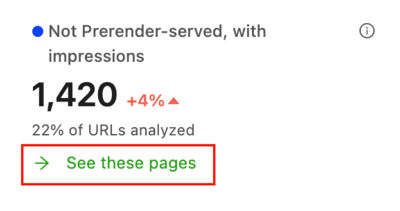
Unique URLs that received at least one impression in Google Search Console during the reporting period, but weren't observed as being served through Prerender.io to Googlebot during the same period.
This can include URLs or sections that are intentionally outside the Prerender.io integration, use a different technical setup, or weren't routed through Prerender.io during the reporting period. It doesn't automatically indicate a problem.
Calculation: URLs with GSC impressions − Prerender.io-served URLs
Each card shows the group's share of Unique URLs analyzed as a percentage. Select See these pages to open the Not Prerender-served tab in Pages.
How do the three KPI groups add up?
The three child groups are mutually exclusive, and together they equal Unique URLs analyzed:
Crawled, with impressions + Crawled, no impressions + Not Prerender-served, with impressions = Unique URLs analyzedIf you'd rather see these same three groups rolled up by site section instead of individual URLs, see Understanding Performance by path in Search Performance.
Info tooltips
Every card has an info icon (ⓘ) with a short in-product explanation. Select it for a quick reminder of what the card counts without leaving the report.
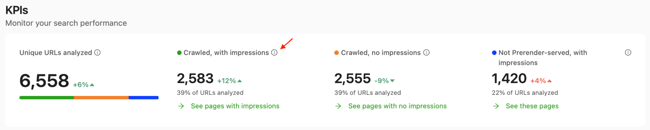
Open Search Performance from the left navigation in your Prerender.io dashboard to see your own KPI breakdown. If you haven't connected Google Search Console yet, see How do I connect Google Search Console to Search Performance?
Related articles
- Understanding Search Performance in your Prerender.io dashboard
- Understanding the Pages tab in Search Performance
- Understanding Performance by path in Search Performance
-
How do I connect Google Search Console to Search Performance?
💬 Still need help? If you have questions about the KPI cards or how to reconcile numbers with your GSC data, our support team can help. → Contact us at support@prerender.io