
TL;DR
When an AI crawler or search engine bot visits your site, Prerender.io intercepts the request at your CDN or server, renders your JavaScript page in a headless browser, caches the result, and returns clean HTML to the crawler, all transparently. Your website visitors never touch this flow.
Why this matters
To appear in AI-generated answers and search results, your website needs to be readable by AI crawlers and search engines—automated bots that scan the web on behalf of GPTBot, ClaudeBot, Googlebot, BingBot, and others.
The problem: most modern websites are built with JavaScript frameworks like React, Vue, Next.js, or Angular. These sites look great to your website visitors, but many AI crawlers and search engines struggle to execute JavaScript. They arrive, see an incomplete or blank page, and leave without reading your content.
Prerender.io solves this by sitting between incoming requests and your server. It identifies crawler traffic, renders the page in a headless browser, and returns fully rendered HTML to the crawler. Your website visitors continue to receive pages directly from your server, exactly as before.
The request flow
Direct website visitor access
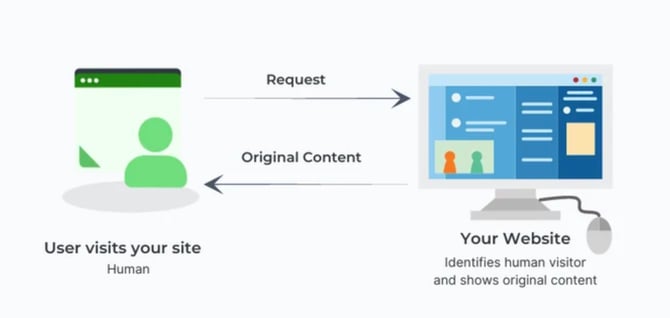
When a website visitor loads your site, your server responds directly. Prerender.io is not involved in this flow.
First-time crawler request (cache miss)
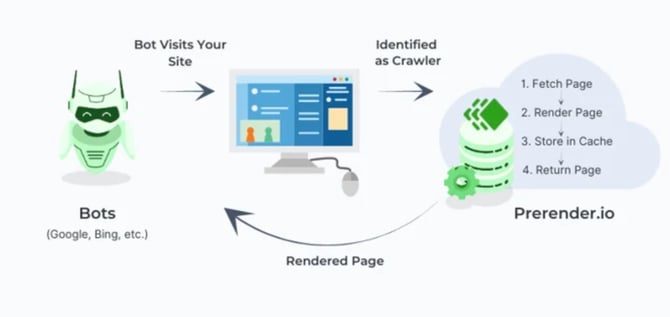
When a crawler visits a page for the first time, Prerender.io has no cached version yet. This is called a cache miss.
Your CDN or server checks the user agent string in the incoming request and identifies it as a crawler. The request is forwarded to Prerender.io with your token. Prerender.io fetches the page, renders it in a headless browser, stores the result in cache, and returns the rendered HTML to the crawler.
The code that makes this happen looks like this:
curl -H "X-Prerender-Token: YOUR_TOKEN" https://service.prerender.io/https://www.example.com/
This first render may take several seconds. Every subsequent request for the same URL is served instantly from cache.
Repeated crawler requests (cache hit)
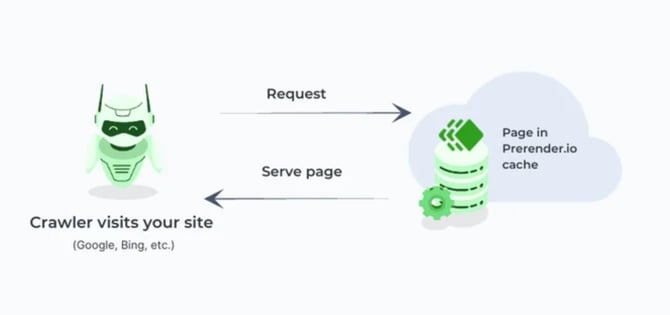
After the first render, Prerender.io serves all subsequent requests for that URL directly from cache. This is called a cache hit. Crawlers receive the rendered page immediately, without triggering a new render.
Content updates and recaching
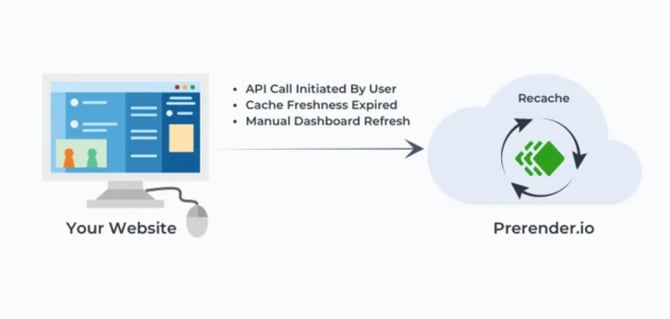
When your content changes, the cached version may become outdated. Prerender.io supports three recaching methods:
- Manual recache via your Prerender.io dashboard.
- Scheduled recache using a TTL (time-to-live) setting, also called cache expiration.
- API-triggered recache to refresh specific URLs automatically after a deployment.
- Custom cache expiration to set different recaching schedules for specific URL patterns or entire domains. Available on Pro and Enterprise plans.
You control which method fits your publishing workflow. See How cache expiration works in Prerender.io for step-by-step instructions.
What AI crawlers and search engines receive
Without Prerender.io, an AI crawler visiting a JavaScript-built page may see an empty HTML shell. The content has not loaded because JavaScript has not executed.
With Prerender.io, the same crawler receives a fully rendered HTML page, including:
- All visible text and headings.
- Metadata and Open Graph tags.
- Structured data (JSON-LD, schema markup).
- Internal links for further crawling.
This is the same content your website visitors see. The difference is that crawlers receive it as static HTML, which they can read without executing JavaScript.
For the full list of AI crawler user agents Prerender.io identifies by default, see Recommended AI crawlers for Prerender.io.
How to integrate Prerender.io with your stack
Prerender.io needs to sit in the request path so it can identify and intercept crawler traffic. There are two ways to do this.
CDN integration. If you already use a CDN like Cloudflare or Akamai, this is the fastest option. Configuration is handled at the CDN layer with minimal code changes.
Backend integration. If you need more control over which requests are routed to Prerender.io, configure the integration on your server. This requires code changes but gives you full flexibility.
See Integrations overview for setup guides for each platform.
ℹ️ Not sure which integration fits your stack? Ask Nexus, your AI integration assistant inside your Prerender.io dashboard. Describe your setup and Nexus will recommend the right path and walk you through configuration.
Video overview
Here is a short video walkthrough of how the full request flow works.
Related articles
- Integrations overview
- How do I clear my Prerender.io cache?
- Recommended AI Crawler User Agents for Prerender.io
- Getting started
💬 Still need help? If you have questions about how Prerender.io works or fits your tech stack, our support team can help. → Contact us at support@prerender.io