
Check a URL now asks Google for one page's latest index status on demand, so you do not have to wait for Prerender.io's daily automatic check. It returns Google's own verdict for that page, in Search Console's exact wording, with the date Google last crawled it, when Google reports one. It is available on Pro and Enterprise Plus once you connect Google Search Console, and it has its own daily allowance separate from the automatic inspections.
What Check a URL now doesEach day, Prerender.io automatically inspects a sample of your pages and shows the results in the Google index status section. Check a URL now lets you jump the queue for a single page: you ask for that page, and Prerender.io fetches its latest result from Google's Search Console URL Inspection API at that moment, rather than reading the stored daily data.
This is useful when you want Google's latest recorded status for a page without waiting for the next daily refresh. If you have just fixed or submitted the page, the result may not change until Google re-crawls it.
What you need- A Pro or Enterprise Plus plan. Check a URL now is part of Search Performance, which is not available on Starter or Growth.
- A connected Google Search Console account. You connect Google Search Console once through Prerender.io and select the properties you want to use. Prerender.io uses that connection to run the inspection.
- In your Prerender.io dashboard, open the Search Performance page.
- Start a check in whichever way suits you: enter the page's URL in the check field, select a page from a row in the Google index status section, or refresh a page you already have open in its details panel. [Publisher: confirm the exact in-product wording and placement of these entry points before publishing.]
- Read the result alongside the page's data in Search Performance. Prerender.io shows Google's latest index status for that page next to Prerender.io's own crawl data for it. [Publisher: confirm where the result appears for each entry point against the shipped UI.]
What the result shows
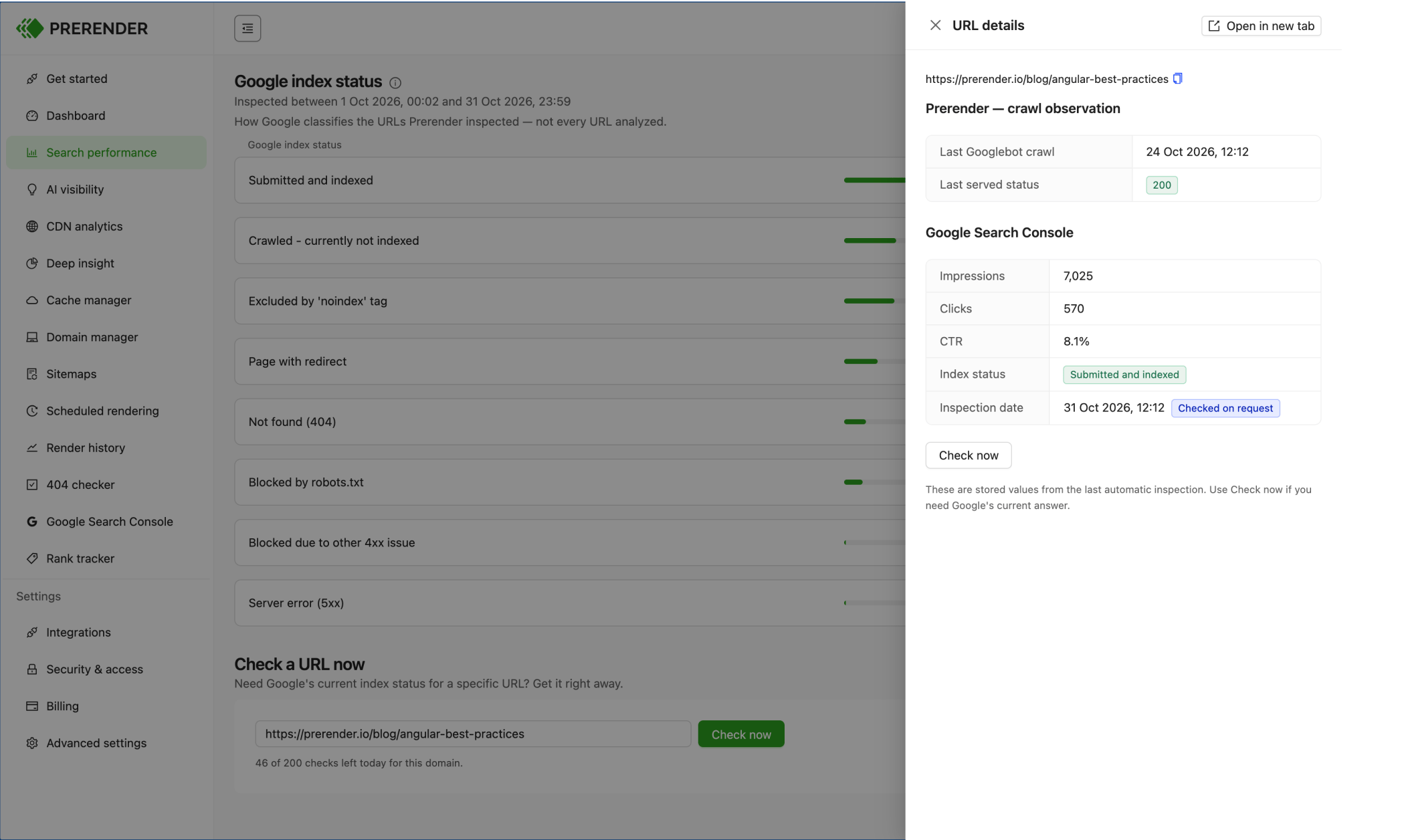
The result comes straight from Google's Search Console URL Inspection API, in Google's exact wording. Depending on what Google returns for the page, you may see:
- The index status. Google's verdict for the page, such as
Submitted and indexed,Crawled - currently not indexed, orDuplicate without user-selected canonical. These are the same statuses you see grouped in the Google index status section. - The inspection date. When this result was fetched from Google.
- The date Google last crawled the page, when Google reports it.
- Canonical and robots information, when Google returns it.
Prerender.io shows this next to its own data for the page, such as when Prerender.io last crawled it and the last HTTP status it saw, so Google's view and Prerender.io's view sit side by side. Fields that Google does not return for a page are shown as —.
ℹ️ Because every status is Google's own, you can look any of them up directly in Google's Search Console documentation to understand what it means and how to resolve it.
Check a URL now has its own daily allowance, separate from the daily automatic inspections, so using it does not reduce the pages Prerender.io checks on its own.
- You can run up to 50 per domain per day. When you reach that limit, the check field is disabled until the daily allowance resets.
- Google also caps inspections per Search Console property, and Prerender.io's allowances are set below that cap. If Google's own limit is reached, a check can fail even when your Check a URL now allowance has not run out.
ℹ️ If you reach the daily allowance, or a check fails because Google's limit was reached, wait and try again later, or check the page's latest stored result in the Google index status section instead.
How it differs from the Google index status section
The Google index status section shows stored results from Prerender.io's daily automatic check, so a page's status there can be up to 30 days old. Check a URL now fetches the latest result Google holds for a single page at the moment you ask. That result is Google's most recent indexed view, based on its last crawl, so a change Google has not re-crawled yet will not appear. Use the section for the overall picture across your inspected pages, and Check a URL now when you need one page's latest recorded status.
⚠️ If your Google Search Console connection is removed or its access is revoked, Check a URL now cannot run until you reconnect, because it depends on that connection to reach Google.
💬 Still need help? If a check will not run, or you have questions about a status it returns, our support team can help. → Contact us at support@prerender.io
- Google index status in your Prerender.io dashboard — how Prerender.io shows Google's index status for the pages it checks each day.
- Understanding Search Performance in your Prerender.io dashboard — how Prerender.io combines your crawl data with Google Search Console search data.