
TL;DR
To apply a coupon code, log in to your Prerender.io dashboard, go to Settings > Billing > Offers and discounts, enter your code in the New discount box, and click Apply. The discount takes effect from your next billing cycle.
When you would apply a coupon code
Coupon codes can give you a discount on your subscription or a promotional benefit on your Prerender.io account. Applying your code before your next billing cycle makes sure the eligible savings show up on the next invoice. The same flow works whether you are upgrading to a paid plan for the first time or redeeming a promotional offer on an existing plan.
How to apply a coupon code
Step 1: log in to your Prerender.io dashboard.
Open dashboard.prerender.io and sign in to the account whose plan you want to apply the coupon to. You will need account owner or admin access to change billing settings.
Step 2: open Billing under Settings.
In the left sidebar, expand Settings and click Billing.
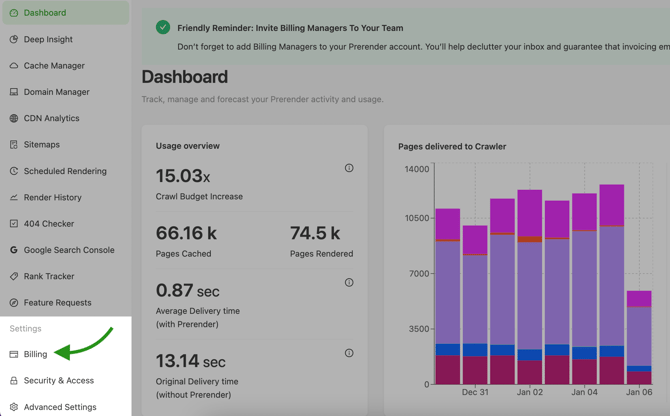
Step 3: open Offers and discounts.
On the Billing page, click Offers and discounts.

Step 4: enter your coupon code and apply it.
In the New discount box on the right side of the page, type or paste your coupon code, then click Apply.
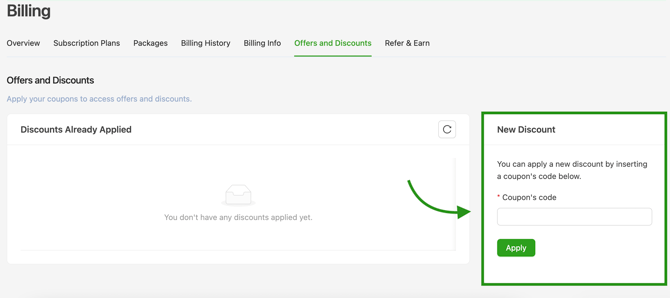
✅ Your coupon code has been applied when the discount appears on the Offers and discounts page and is reflected in the totals on your next invoice.
Get support
If your coupon code does not apply, the discount looks wrong on your invoice, or you have questions about a promotion:
- Email support@prerender.io
- Or submit a ticket from your Prerender.io dashboard
To help us resolve your issue as quickly as possible, please include:
- The exact coupon code you tried.
- The error message you saw, if any.
- A screenshot of the Offers and discounts page after applying the code.
Sharing these details up front helps our team diagnose the problem and get you back on track faster.
Related articles
- Plan options and how to find the best plan
- Changing your Prerender.io plan
- Invoices and payment methods
- Payment terms
💬 Still need help?
If you have questions about your coupon code, an invoice, or your billing cycle, our support team can help.
→ Contact us at support@prerender.io