
TL;DR
Googlebot is included in Prerender.io's default crawler list, so most integrations detect it automatically. If you're running a custom server setup or need to confirm coverage, add Googlebot's user agent string to your integration configuration. The change takes a few minutes and requires no Prerender.io dashboard changes.
Why this matters
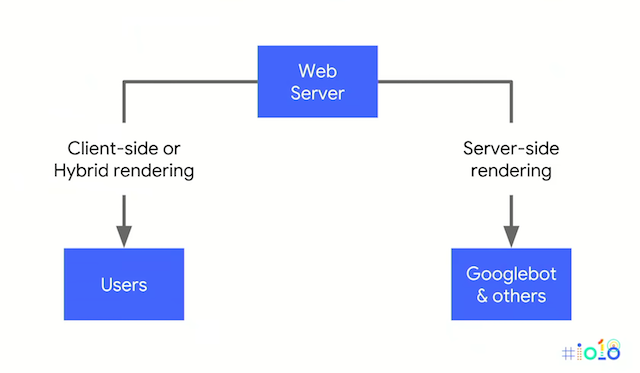
When Googlebot visits a JavaScript-heavy site, it may see an incomplete page if your server does not serve it pre-rendered HTML. Prerender.io intercepts requests from Googlebot and other crawlers, renders the page in a headless browser, and returns clean HTML—without changing anything your website visitors see.
Google documents this approach in their JavaScript rendering guidance as a workaround for sites that cannot implement server-side rendering. Serving pre-rendered HTML to crawlers based on their user agent is permitted and does not constitute cloaking, as long as you serve the same content to both crawlers and website visitors.
ℹ️ If you're using a Prerender.io-maintained integration (Nginx, Cloudflare, Vercel, and others), Googlebot is already included in the default crawler list. The steps below apply if you're running a custom server configuration or need to add crawlers manually.
You may also want to add AI crawlers—GPTBot, ClaudeBot, and Googlebot—to ensure your content is discoverable in AI-generated answers and search results. See How do I add additional bots to my integration? for a complete list.
Step 1: Confirm your Prerender.io account is active.
Log in to your Prerender.io dashboard. Copy your Prerender.io token from the dashboard — you'll need it in the configuration steps below.
Step 2: Check whether Googlebot is already detected.
Before making any changes, confirm whether your integration is already routing Googlebot requests to Prerender.io.
Use Google Search Console's URL Inspection tool to fetch one of your pages as Googlebot. If the rendered HTML matches your full page content, your integration is already working and no further changes are needed.
If the page appears incomplete or blank, continue to Step 3.
Step 3: Add Googlebot to your integration configuration.
Find the configuration file or code block for your server or integration. Add Googlebot's user agent string using the example that matches your setup.
nginx
In your nginx configuration, add the following condition to route crawler requests to Prerender.io:
nginx
if ($http_user_agent ~* "googlebot|bingbot|yandex|baiduspider|twitterbot|facebookexternalhit|rogerbot|linkedinbot|embedly|quora link preview|showyoubot|outbrain|pinterest|slackbot|vkShare|W3C_Validator") { set $prerender 1; }Apache
In your Apache configuration, add the following RewriteCond to detect Googlebot and other crawlers:
apache
RewriteCond %{HTTP_USER_AGENT} googlebot|bingbot|yandex|baiduspider|facebookexternalhit|twitterbot|rogerbot|linkedinbot|embedly|quora\ link\ preview|showyoubot|outbrain|pinterest|slackbot|vkShare|W3C_Validator [NC,OR]prerender-node
If you're using prerender-node, push the crawler user agents to the existing array:
js
var prerender = require('prerender-node').set('prerenderToken', 'YOUR_TOKEN'); prerender.crawlerUserAgents.push('googlebot'); prerender.crawlerUserAgents.push('bingbot'); prerender.crawlerUserAgents.push('yandex'); app.use(prerender);Rack::Prerender (Rails)
If you're using Rack::Prerender, pass the full crawler_user_agents array in your middleware configuration:
ruby
config.middleware.use Rack::Prerender, prerender_token: 'YOUR_TOKEN', crawler_user_agents: [ 'googlebot', 'bingbot', 'yandex', 'baiduspider', 'facebookexternalhit', 'twitterbot', 'rogerbot', 'linkedinbot', 'embedly', 'bufferbot', 'quora link preview', 'showyoubot', 'outbrain', 'pinterest/0.', 'developers.google.com/+/web/snippet', 'www.google.com/webmasters/tools/richsnippets', 'slackbot', 'vkShare', 'W3C_Validator', 'redditbot', 'Applebot', 'WhatsApp', 'flipboard', 'tumblr', 'bitlybot', 'SkypeUriPreview', 'nuzzel', 'Discordbot', 'Google Page Speed', 'Qwantify' ]ASP.NET MVC
In your web.config, add the crawlerUserAgents attribute to the Prerender.io configuration element:
xml
<prerender token="YOUR_TOKEN" crawlerUserAgents="googlebot,bingbot,yandex"></prerender>Java (prerender-java)
In your web.xml, add the crawlerUserAgents parameter to the Prerender.io filter:
xml
<filter> <filter-name>prerender</filter-name> <filter-class>com.github.greengerong.PreRenderSEOFilter</filter-class> <init-param> <param-name>prerenderToken</param-name> <param-value>YOUR_TOKEN</param-value> </init-param> <init-param> <param-name>crawlerUserAgents</param-name> <param-value>googlebot,bingbot,yandex</param-value> </init-param> </filter>Step 4: Deploy your configuration changes.
Save your configuration file and deploy or restart your server so the changes take effect.
For nginx, reload the configuration with nginx -s reload. For Apache, restart the service with apachectl restart. For Node.js or Rails applications, redeploy your application.
Step 5: Verify your integration is working.
Confirm that Prerender.io is correctly serving pre-rendered HTML to Googlebot.
➡️ See How to verify your Prerender.io integration is working for step-by-step instructions.
✅ Your integration is working when Prerender.io shows cached pages appearing in your dashboard within 2 to 5 minutes of your first crawler request. In Google Search Console, the URL Inspection tool should return a fully rendered page when fetched as Googlebot.
If verification fails, see Troubleshooting your Prerender.io integration and best practices.
Related articles
- How do I add AI crawlers and bots to my integration?
- How do I verify my Prerender.io integration?
- Recommended AI Crawler User Agents for Prerender.io
- How Prerender.io works
💬 Still need help? If you have questions about adding Googlebot or other crawlers to your Prerender.io integration, our support team can help. → Contact us at support@prerender.io