
TL;DR
Google index status shows whether Google has indexed the pages Prerender.io inspects, and if not, Google's own reason. Prerender.io checks a sample of your pages every day through the Google Search Console URL Inspection API and groups the results by status, using Google's exact wording. It is available on Pro and Enterprise Plus once you connect Google Search Console.
What Google index status showsEach day, Prerender.io asks Google about a selected set of your pages, one page at a time, and stores Google's answer: whether the page is indexed, and if not, the reason Google gives. Google index status collects those answers and groups your pages by status, so you can see Google's verdict next to Prerender.io's own crawl data and the page's search numbers.
The statuses come straight from the Google Search Console URL Inspection API, in Google's exact wording. This puts Google's reasons for indexing or skipping a page in the same place as the rest of your Search Performance data.
What you need- A Pro or Enterprise Plus plan. Google index status is part of Search Performance, which is not available on Starter or Growth.
- A connected Google Search Console account. You connect Google Search Console once through Prerender.io and select the properties you want to use. Prerender.io reads your Search Console data to run the inspections.
ℹ️ If your Google Search Console connection is removed or its access is revoked, inspections stop and the section cannot update until you reconnect. Your existing results stay visible while your plan is active.
Statuses appear in Google's exact Search Console wording, never shortened, and only the statuses that exist in your data are shown. The list is not fixed in advance, so your account may show more or fewer than the examples below.
Common statuses include:
Submitted and indexedCrawled - currently not indexedDiscovered - currently not indexedExcluded by 'noindex' tagPage with redirectDuplicate without user-selected canonicalAlternate page with proper canonical tagURL is unknown to GoogleSoft 404
What it covers, and what it does not
Google index status is a sample, not a full-site audit. Keeping that in mind helps you read the numbers correctly.
- It covers the pages Prerender.io inspected, not your whole site. Prerender.io inspects up to 100 URLs per domain per day, and the section always shows the last 30 days of checks. The counts describe that inspected sample, not every URL on your site.
- It is not live. Results are stored and can be up to 30 days old. Google's own index data can also lag real changes by a couple of days.
- It is not a replacement for Google Search Console. For a full-site view, use Search Console's own Page indexing report. Google index status is a focused, in-dashboard view of the pages Prerender.io checks.
ℹ️ The daily inspection limit applies per domain, and Google itself caps inspections per Search Console property. If a site has fewer pages than the daily limit, every page is checked.
Google index status is at the bottom of your Search Performance page. Open Search Performance from your Prerender.io dashboard, then scroll to the Google index status section to see your pages grouped by status. Each status lists the pages behind it.
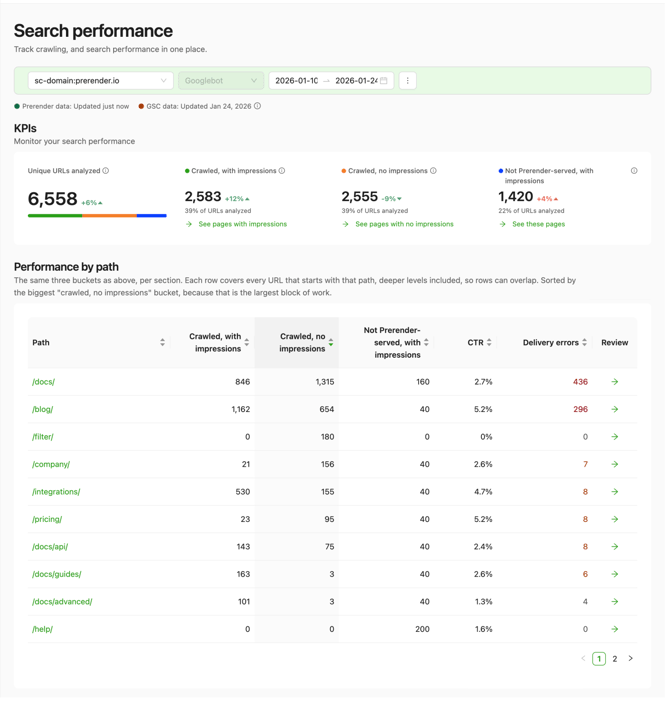
You can also see a single page's status in the Pages tab. The Index status column shows each page's latest status when it was inspected in the last 30 days; pages not inspected in that window are marked accordingly.
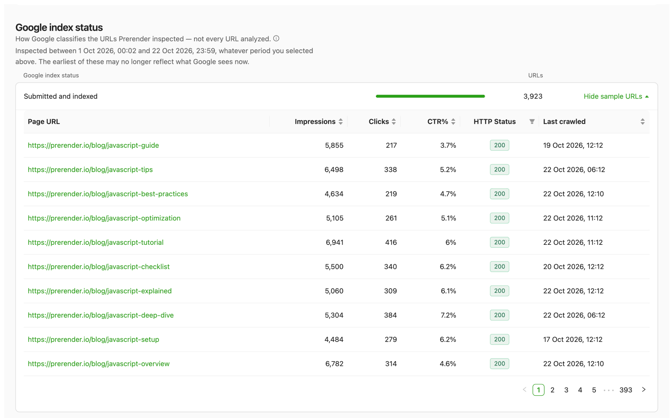
Prerender.io refreshes Google index status once a day. The section header shows the period it covers and when the data was last updated, so you can tell how fresh the results are.
Related articles💬 Still need help? If you have questions about a status in your Google index status section, or about connecting Google Search Console, our support team can help. → Contact us at support@prerender.io
- Understanding Search Performance in your Prerender.io dashboard — how Prerender.io combines your crawl data with Google Search Console search data.
- How Prerender.io works — the request flow from crawler to cached HTML.