
TL;DR
You can export a CSV of all 404 errors Prerender.io has logged for up to the past 30 days. In your Prerender.io dashboard, go to CDN Analytics, set your date range, filter by status code 404, and click Export. The report is sent to your account email address automatically.
404 errors in your Prerender.io cache can affect how AI crawlers and search engines index your site. Identifying broken URLs early helps you fix missing redirects and keep your content fully discoverable.
Step 1: Log in to your Prerender.io dashboard.
Go to Prerender.io dashboard and log in to your account.
Step 2: Open CDN Analytics and set your date range.
In the left navigation, click CDN Analytics.
At the top of the page, use the Date filter to select the time range you want to cover. The table supports up to the past 30 days.
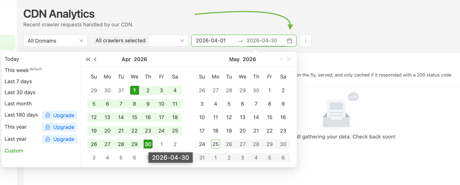
Step 3: Filter the table by status code 404.
- Click the funnel icon at the top of the table.
- Type
404in the filter field. - Click OK.
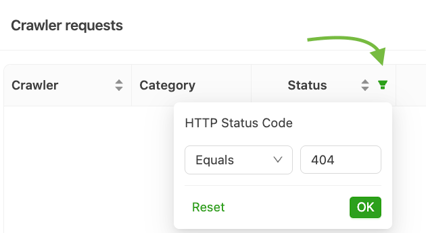
Step 4: Export the filtered report.
Click the Export button. Your applied date range and status code filter are included automatically.
Prerender.io processes the data and sends a CSV to your account email address.

Step 5: Verify the report arrived in your email.
Open your inbox and look for an email from Prerender.io containing your 404 report. Open the CSV directly, or copy the download link into your browser.
✅ Your report is ready when you receive an email with the CSV attached or linked. The file lists every URL that returned a 404 within your selected date range.
If the email did not arrive, check your spam folder first, then contact support@prerender.io.
Related articles
- Prerender.io status codes explained
- How do I find and fix soft 404s in Prerender?
- Why is Prerender.io caching my 404 pages as 200?
- Do 404 or 301 pages count towards my render counter?
💬 Still need help? If your export email did not arrive, or if you need a report for a date range beyond 30 days, our support team can help. → Contact us at support@prerender.io