
TL;DR
You can cancel your Prerender.io subscription from the Billing page in your dashboard without contacting support. Scheduled recaching stops immediately; live rendering continues for 30 days. You can reactivate at any time.
Self-serve cancellation is available only for paid self-serve plans. If you are on an Enterprise agreement or a custom contract, contact support@prerender.io to end or modify your contract.
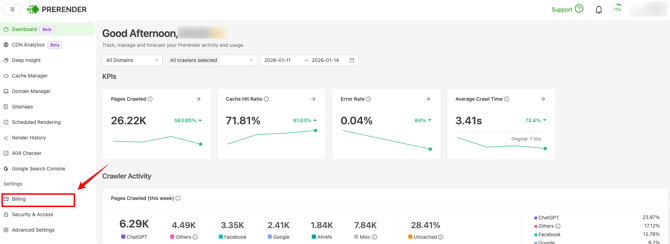
Step 1: open the Billing page in your Prerender.io dashboard.
Go to Billing in your Prerender.io dashboard. Your current plan, render usage, and limits are all displayed here.
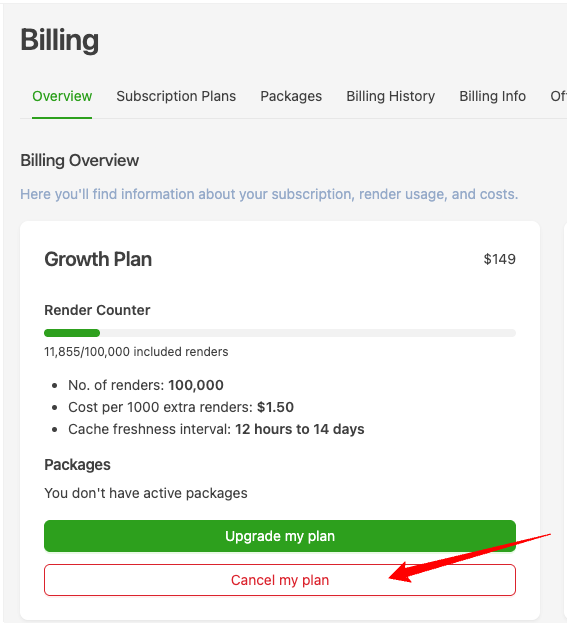
Step 2: click the Cancel button.
Find and click the Cancel button on the Billing page.
Important: If the Cancel button is missing or not responding, contact support via the Support menu in your dashboard or email support@prerender.io.
What happens after you cancel
- Scheduled recaching stops immediately. Live (on-demand) rendering continues for 30 days after cancellation. You won't be charged beyond the current billing period.
- Extra renders are billed at the start of the next cycle. If you exceeded your monthly render limit before cancellation, those extra renders are billed at the start of the next billing cycle — even after your subscription ends.
- Reactivation is available any time. Return to the Billing page and choose a plan to reactivate, whether before or after your subscription ends.
- Confirmation email. Prerender.io may send a cancellation confirmation email — check your inbox after completing the steps above.
- No cancellation fees (self-serve plans). Prerender.io does not charge cancellation fees for self-serve plans. Enterprise and custom-contract customers should review their agreement for any applicable terms.
For a full breakdown of what stops and what continues after cancellation, see Canceled or suspended account.
Related Articles / FAQs:
Still need help? If you have questions about your subscription, usage, or billing before you cancel, our support team is here to help. → Contact us at support@prerender.io