
This integration is community-maintained, not officially supported by Prerender.io. We provide the configuration guide below, but the rules and behaviors live inside your Akamai property and are your responsibility to maintain.
TD;DR
To integrate Prerender.io with Akamai, add property rules that detect AI crawlers and search engine bots by user agent, ignore static file extensions, forward matched requests to service.prerender.io with your Prerender.io token, rewrite the outgoing request path to include your origin URL, and bypass edge cache for bot traffic so crawlers always get the freshest content. Most setups take 30 to 60 minutes in Akamai Property Manager.
Before you start
You will need:
- An active Prerender.io account.
- Your Prerender.io token. Find it in your dashboard under Security and Access → Prerender Token.
- Access to your Akamai Property Manager with permission to edit and activate property rules.
ℹ️ Not sure whether Akamai is the right integration point for your stack? Ask Nexus, your AI integration assistant, inside your Prerender.io dashboard. Describe your setup and Nexus will confirm the right path.
Step 1: detect AI crawlers and search engine bots by user agent.
Open your Akamai property in Property Manager and add a match criterion that fires when the User Agent header matches any of the bot patterns below.
*Google-InspectionTool*
*googlebot*
*Yahoo! Slurp*
*bingbot*
*yandex*
*baiduspider*
*facebookexternalhit*
*twitterbot*
*rogerbot*
*linkedinbot*
*embedly*
*quora link preview*
*showyoubot*
*outbrain*
*pinterest/0.*
*developers.google.com/+/web/snippet*
*slackbot*
*vkShare*
*W3C_Validator*
*redditbot*
*Applebot*
*WhatsApp*
*flipboard*
*tumblr*
*bitlybot*
*SkypeUriPreview*
*nuzzel*
*Discordbot*
*Google Page Speed*
*Qwantify*
*pinterestbot*
*Bitrix link preview*
*XING-contenttabreceiver*
*Chrome-Lighthouse*
*TelegramBot*
*SeznamBot*
*Perplexity*
*OAI-SearchBot*
*ChatGPT*
*GPTBot*
*ClaudeBot*
*Amazonbot*
The list covers AI crawlers (GPTBot, ClaudeBot, Perplexity, OAI-SearchBot, ChatGPT, Amazonbot) and traditional search engine bots (Googlebot, BingBot, Applebot, Yandex), plus social and link-preview bots that benefit from pre-rendered HTML.
ℹ️ Akamai Bot Manager provides more flexible and reliable bot detection if you have it enabled. The user-agent list above works as a baseline regardless.
Step 2: ignore static file extensions.
Static assets do not need to be pre-rendered. Add a match criterion that excludes the file extensions below so Akamai serves them directly without forwarding to Prerender.io.
js
css
xml
less
png
jpg
jpeg
gif
pdf
doc
txt
ico
rss
zip
mp3
rar
exe
wmv
avi
ppt
mpg
mpeg
tif
wav
mov
psd
ai
xls
mp4
m4a
swf
dat
dmg
iso
flv
m4v
torrent
woff
ttf
svg
webmanifest
json
This prevents Prerender.io from being asked to render images, fonts, scripts, or other non-HTML resources, which saves render usage and avoids unnecessary upstream traffic.
Step 3: forward matched requests to service.prerender.io.
When the user agent matches and the request is not for a static asset, route the request to Prerender.io's service endpoint.
Add an Origin Server behavior with these settings:
- Origin Type: Your origin
- Origin Server Hostname:
service.prerender.io - Forward Host Header: Origin Hostname
- Cache Key Hostname: Origin Hostname
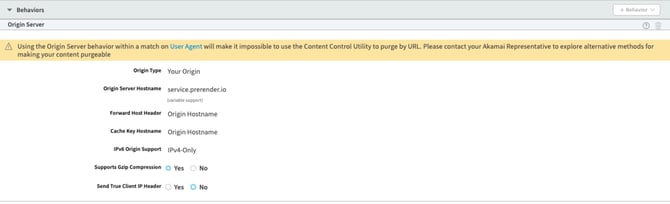
Next, add a Modify Outgoing Request Header behavior to attach your Prerender.io token:
- Header Name:
x-prerender-token - Value: your Prerender.io token

⚠️ Without the x-prerender-token header, Prerender.io will reject the forwarded request. Double-check the header name spelling and the token value before activating the property.
Step 4: rewrite the outgoing request path.
Prerender.io needs the full original URL of the page you want rendered. Use Akamai property variables to rewrite the outgoing request path so it includes the scheme, host, and original URL.
Add a Modify Outgoing Request Path behavior with:
- Action: Replace Entire Path
- Replace with:
/{{builtin.AK_SCHEME}}://{{builtin.AK_HOST}}{{builtin.AK_ORIGINAL_URL}}
Paste the value on a single line with no spaces.

Step 5: bypass edge cache for bot traffic.
AI crawlers and search engines come through frequently and need the freshest version of your content. Caching their requests at the Akamai edge layer would serve them stale HTML.
Inside the same rule that matches the bot user agents, disable edge caching and parent caching. For lower latency between Akamai and Prerender.io, also enable SureRoute and persistent connections to service.prerender.io.
The page itself will still be cached inside Prerender.io, which is where freshness is managed for crawler traffic.
Step 6: verify your integration is working.
Activate the property in Akamai (staging first, then production), then confirm Prerender.io is receiving requests and returning rendered HTML.
Test with a curl command using a crawler user agent:
curl -v -A googlebot https://www.yourdomain.com/Look for the x-prerender headers in the response and confirm the body is fully rendered HTML rather than a JavaScript shell.
→ See Verify your Prerender.io integration for the full verification procedure.
✅ Your integration is working when cached pages start appearing in your Prerender.io dashboard within 2 to 5 minutes of your first crawler request, and curl with a crawler user agent returns rendered HTML with x-prerender response headers.
If you see the message "Prerender integration not detected," see What should I do if I receive a 'Prerender integration not detected' error? for the most common causes and fixes.
Related articles
- How does Prerender.io work with CDNs like Cloudflare, Fastly, or Akamai?
- Available integrations
- How to add additional bots
- How can I integrate Prerender.io if my hosting platform doesn't allow direct server access?
💬 Still need help? If your Akamai integration is not behaving as expected after the six steps above, our support team can help. Please include your full Akamai rule configuration (or screenshots), the affected URLs, the curl output with a crawler user agent, and any error messages from the Prerender.io dashboard. → Contact us at support@prerender.io