
TL;DR
Open Cache Manager in your Prerender.io dashboard and click the filter above the table labelled "Pages that have not been requested in the past 30 days". The table refreshes to show only URLs that no AI crawler or search engine has requested in the last month. Use this view to clean up stale cache entries, free up render budget, and focus recaching on pages that still matter.
What this filter shows
The filter narrows your cached page list to URLs that have not been requested by any bot (AI crawlers like GPTBot, ClaudeBot, and Perplexity, plus search engines like Googlebot and Bingbot) in the past 30 days. These pages are still in your cache but have not been served to a crawler recently, which usually means one of three things:
- The URL is no longer linked from elsewhere on your site or the public web.
- The page is genuinely seasonal or low-traffic and only gets crawled at certain times.
- The page was deprecated or moved but the cached snapshot is still around.
How to use the filter
Step 1: open the Cache Manager.
Log in to your Prerender.io dashboard and open the Cache Manager menu.
Step 2: enable the filter.
Just above the cached pages table, find the filter labelled "Pages that have not been requested in the past 30 days" and click it.
Step 3: review the filtered list.
The table refreshes to show only pages that have had zero bot requests in the past 30 days. From here you can:
- Select rows and click Clear Cache to remove URLs you no longer need cached.
- Sort by First Seen or SEO Score to triage which stale pages are worth keeping.
- Export the list (or copy URLs) for a wider audit against your sitemap or analytics.
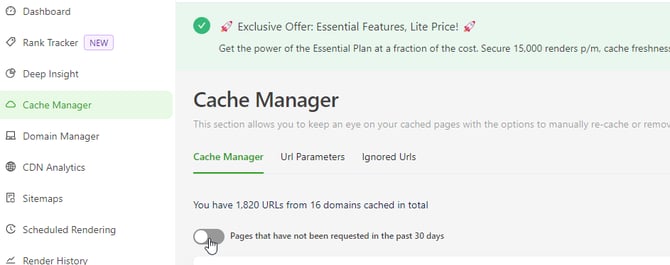
✅ The filter is active when the page count at the top of the table drops and you see only URLs that haven't been requested by bots in the past 30 days. Click the filter again to clear it.
Why this view is useful
- Surfaces forgotten URLs. Pages that are still in cache but no longer linked or relevant show up here first.
- Frees render budget. Removing stale URLs reduces your monthly recache work, so the priority and normal queues spend more time on pages that still matter. See rendering queues for how that scheduling works.
- Highlights deprecated content. If a page returns 404 or 301 at your origin but is still cached as 200, it usually shows up here because crawlers stopped following the dead link.
Things to keep in mind
- Seasonal pages can look stale. A Black Friday landing page may have zero bot activity in June. Review before bulk-purging.
- This view tracks bot activity, not human traffic. A page with no recent bot requests can still get lots of direct human visits. Cross-check with your analytics before removing URLs you suspect are still useful.
- Use this filter alongside SEO Score. Pages that haven't been crawled in 30 days and have a low SEO Score are the strongest candidates for removal.
Get support
If the filter shows pages that you expect crawlers to be hitting (or doesn't surface pages you know are stale), our support team can help check what's happening:
- Email support@prerender.io
- Or click the green Support button in your Prerender.io dashboard and choose Contact Support
To help us resolve your issue as quickly as possible, please include:
- A few example URLs that are showing (or not showing) in the filter unexpectedly.
- Whether the URLs are referenced in your sitemap or linked from public pages.
- Recent changes to your site, sitemap, or robots.txt that might have changed crawler behaviour.
Related articles
- How cache expiration works
- Rendering queues
- Using the Domain Manager
- How to purge cache
- Do 404 or 301 pages count toward my render counter?
💬 Still need help?
If the filter is empty when you expect stale pages, or pages are showing up that you know crawlers are still hitting, our support team can help dig into your account.
→ Contact us at support@prerender.io