---
title: How do I change the speed of my Prerender render queue?
description: Change your Prerender render queue speed to cache more URLs before a promotion or to protect your infrastructure from request overload.
---
[Skip to content](https://docs.prerender.io/docs/how-do-i-change-the-speed-of-my-render-queue#main-content)

Open main navigation
Close main navigation
- [Contact us](mailto:support@prerender.io)
[Contact us](mailto:support@prerender.io)
How can we help you?
- There are no suggestions because the search field is empty.
1. [Knowledge Base - Prerender.io](https://docs.prerender.io/docs?hsLang=en)
2. [Troubleshooting](https://docs.prerender.io/docs/troubleshooting?hsLang=en)
May 25, 2026
# How do I change the speed of my Prerender render queue?
## Cache more URLs before a promotion, or slow Prerender down to protect your infrastructure.
#### **TL;DR**
Prerender has two rendering queues—Manual/API (which you can speed up) and Automated (which you can slow down indirectly via cache expiration). To change Manual/API speed, use the `/change-recache-speed` API endpoint. Confirm a safe target speed with your infrastructure team first to avoid triggering firewall or DOS protection.
---
### When you might want to change your render queue speed
There are two common reasons:
- **Speed up your Manual/API queue** when you need a large batch of URLs cached in time for a promotion, sale, or content launch.
- **Slow down your Automated queue** when Prerender is sending too many requests per day and your servers, firewall, or DOS protection are struggling to keep up. This usually happens when you have a large cache combined with a short cache expiration setting.
ℹ️ Prerender uses two queues. The **Manual/API queue** handles urgent or user-triggered recaches (sitemap submissions, API calls, manual dashboard actions). The **Automated queue** handles routine background recaches as cached pages expire. See [Rendering queues](https://docs.prerender.io/docs/10-recaching?hsLang=en) for the full breakdown.
---
### Step 1: Identify which queue you need to change
Decide which queue applies to your situation before going further. The methods are different and they're not interchangeable.
| Your goal | Queue to change | Method |
| --- | --- | --- |
| Cache more URLs faster | Manual/API queue | Recache API endpoint or email support |
| Reduce request volume on your servers | Automated queue | Increase your cache expiration |
You can directly adjust the Manual/API queue speed. The Automated queue speed is set by Prerender based on your cached page count and cache expiration—you influence it indirectly by changing cache expiration.
### Step 2: Check your current rendering speed in your dashboard
Log in to your [Prerender dashboard](https://dashboard.prerender.io/recache-queue#?page=1&tab=priority) and open `Caching Queue` from the left navigation. Your current rendering speed is displayed at the top of the queue view.
> 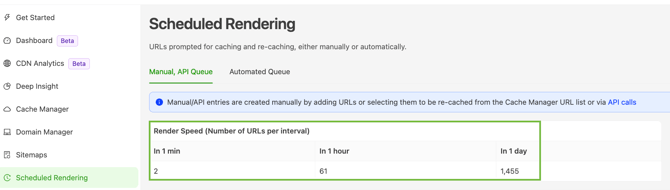
Note the current speed before requesting a change—support will ask for it, and you'll need it to verify the change took effect later.
### Step 3: Confirm a safe target speed with your infrastructure team
Before requesting a faster speed, ask your development or infrastructure team how many URLs per day your servers can safely handle.
⚠️ Setting the rendering speed too high can trigger your firewall or DOS protection, cause server overload, or break your live site for website visitors. Each page Prerender renders involves multiple requests, so the actual request volume is higher than the URL-per-day number suggests.
Bring this answer with you when you contact support or call the API—it's the first thing you'll be asked.
### Step 4: Change your Manual/API queue speed
You have two paths:
Call the `/change-recache-speed` API endpoint. The full request format, required parameters, and authentication details are in [the Prerender REST API reference](https://docs.prerender.io/docs/6-api?hsLang=en). Substitute `YOUR_TOKEN` for your Prerender API token.
Email `support@prerender.io` with the target speed and the four details listed at the bottom of this article. Our Support team will make the change manually.
### Step 5: (Optional) Slow down your Automated queue via cache expiration
If your goal is to reduce Prerender's request volume rather than increase it, you don't change queue speed directly—you increase your cache expiration. A longer cache expiration means Prerender refreshes each page less often, so the total daily request count drops.
Open the [Cache Manager](https://dashboard.prerender.io/cache/cache-manager) in your dashboard, go to `Cache Manager`, and increase the cache expiration value. Save your changes.
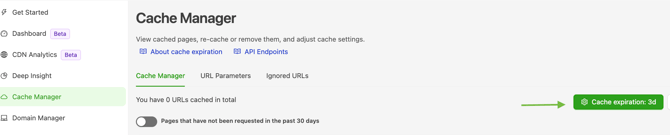
ℹ️ Cache expiration affects how fresh your cached pages stay. A longer expiration reduces Prerender's request volume but means AI crawlers and search engines may see slightly older content between refreshes. See [How does cache expiration work?](https://docs.prerender.io/docs/modify-the-cache-expiration?hsLang=en) for guidance on choosing a value.
### Step 6: Verify the new speed has taken effect
Return to `Caching Queue` in your dashboard and compare the displayed queue speed to the value you noted in Step 2.
- **Manual/API queue:** the change should appear within a few minutes of the API call or support's reply.
- **Automated queue:** the daily request count will adjust gradually as pages expire under the new setting—expect it to settle over the next 24–48 hours.
✅ **Manual/API queue:** the speed shown in`Caching Queue` matches your requested value. **Automated queue:** Prerender's daily volume request to your servers drops, easing the firewall or load issues.
⚠️If the speed hasn't changed within a few hours, reply to your support ticket or re-check your API call's response code. For request-volume issues that persist after lowering speed, see [What should I do if I'm experiencing high volumes of unwanted renders?](https://docs.prerender.io/docs/what-should-i-do-if-im-experiencing-high-volumes-of-unwanted-renders?hsLang=en).
---
### What to include when you contact support
Speed up your support request by including these four details upfront:
- Your current cache expiration setting
- The approximate number of URLs in your cache
- Any infrastructure issues you've already seen (firewall triggers, server load spikes)
- Which queue you're changing—Manual/API or Automated
---
### Related articles
- [Rendering queues](https://docs.prerender.io/docs/10-recaching?hsLang=en)
- [What can I do with the Prerender REST API?](https://docs.prerender.io/docs/6-api?hsLang=en)
- [How cache expiration works in Prerender.io](https://docs.prerender.io/docs/modify-the-cache-expiration?hsLang=en)
- [What should I do if I am experiencing high volumes of unwanted renders?](https://docs.prerender.io/docs/what-should-i-do-if-im-experiencing-high-volumes-of-unwanted-renders?hsLang=en)
---
💬 **Still need help?** If your queue speed isn't changing, your dashboard shows an unexpected value, or you're seeing infrastructure errors after a speed change, our support team can investigate. → Contact us at [support@prerender.io](mailto:support@prerender.io)
- [How Prerender.io works](https://docs.prerender.io/docs/how-prerender-io-works?hsLang=en)
- [Getting started](https://docs.prerender.io/docs/getting-started?hsLang=en)
- [Integrations](https://docs.prerender.io/docs/integrations?hsLang=en#main-content)
- [Prerender.io officially maintained integration](https://docs.prerender.io/docs/integrations?hsLang=en#prerender-io-officially-maintained-integration)
- [Bubble](https://docs.prerender.io/docs/integrations?hsLang=en#bubble)
- [FAQ](https://docs.prerender.io/docs/integrations?hsLang=en#faq)
- [Get Found on AI & Search](https://docs.prerender.io/docs/get-found-on-ai-search?hsLang=en#main-content)
- [Google Search Performance](https://docs.prerender.io/docs/get-found-on-ai-search?hsLang=en#google-search-performance)
- [Troubleshooting](https://docs.prerender.io/docs/troubleshooting?hsLang=en)
- [Billing & Account](https://docs.prerender.io/docs/billing-account?hsLang=en#main-content)
- [Plans & Subscriptions](https://docs.prerender.io/docs/billing-account?hsLang=en#plans-subscriptions)
- [Renders, Usage & Limits](https://docs.prerender.io/docs/billing-account?hsLang=en#renders-usage-limits)
- [Payments & Invoices](https://docs.prerender.io/docs/billing-account?hsLang=en#payments-invoices)
- [Account Access & Security](https://docs.prerender.io/docs/billing-account?hsLang=en#account-access-security)
[](http://prerender.io)
304 S. Jones Blvd #1205, Las Vegas, NV 89107
[mailto:support@prerender.io](mailto:support@prerender.io)
Copyright © 2025, Prerender.io