
TL;DR
Prerender.io only receives the URL of the page you want rendered—it never accesses your website visitors' private data, cookies, or authentication headers. Traffic between your servers and Prerender.io is encrypted via TLS, and each page renders in a fresh, isolated browser instance with no data carried over from previous renders.
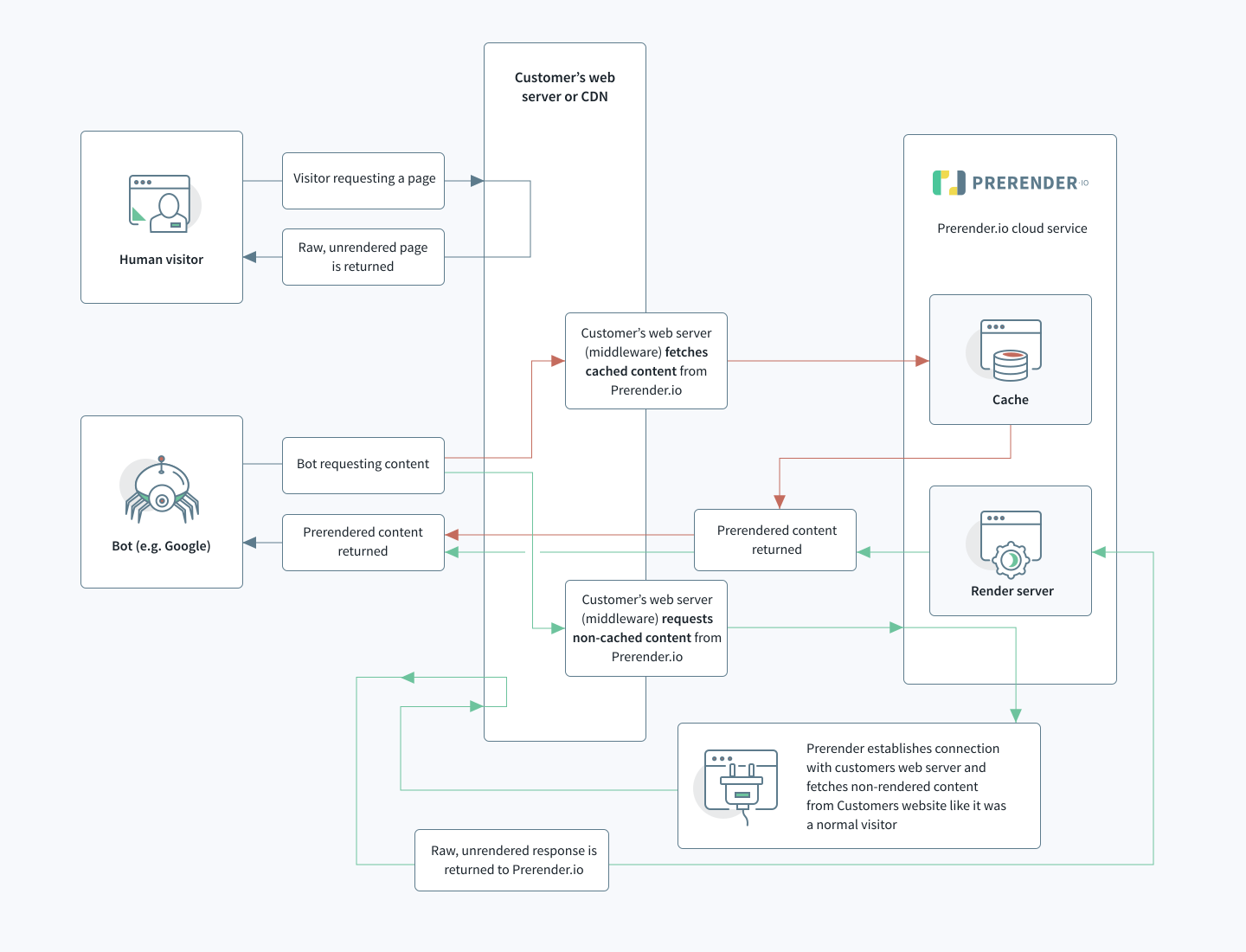
What Prerender.io receives
When an AI crawler or search engine bot visits your site, Prerender's integration intercepts the request and identifies whether it comes from a crawler or a website visitor. If it's a crawler, Prerender receives one piece of information: the URL of the page to render.
Prerender.io does not receive:
- Personal data or visitor identifiers
- Cookies or session tokens
- Authentication headers
- IP addresses of your website visitors
Prerender.io can only access content that is already publicly visible on your website — the same content any unauthenticated website visitor would see. It does not bypass authentication or connect to your internal systems.
You can verify this in Prerender's open-source GitHub repositories.
What Prerender.io stores
User-Agent strings
Prerender.io stores the User-Agent string sent with each request. This string identifies the type of crawler that initiated the request — for example, GPTBot or Googlebot — but does not identify any individual person.
Your server's IP address
Prerender.io stores the IP address of the server that requests rendering. This is used for rate limiting and blocking malicious requests — not for tracking or profiling. See IP addresses for the full list of Prerender's IP ranges.
Rendered HTML
Prerender.io caches the rendered HTML of each page. This cache contains only content that is already publicly accessible on your website — nothing that a website visitor could not access without Prerender.
Cookie handling
Each page renders in a new, isolated browser instance. Prerender does not carry cookies or any stored data between renders — every render starts from a clean state.
How your data is encrypted
Traffic between your servers and Prerender
All requests between your servers and Prerender's rendering service travel through a TLS-secured channel. TLS (Transport Layer Security) is the same encryption standard used by HTTPS.
Rendering requests to your website
Prerender.io prioritizes HTTPS when fetching your pages for rendering. If your web server does not support HTTPS, Prerender degrades the connection to HTTP to complete the render.
⚠️ If your site does not serve content over HTTPS, rendering requests will use an unencrypted HTTP connection. This request flow involves only Prerender's rendering servers and your website — no personal data is transmitted.
Cached HTML at rest
Rendered HTML stored in Prerender's cache is not encrypted at rest. However, the cache contains only publicly accessible content — equivalent to what any unauthenticated visitor would see. Prerender's internal systems are isolated from the public internet, and cached data is only reachable through encrypted communication channels.
ℹ️ If your security review requires encryption at rest, contact support@prerender.io to discuss your requirements.
💬 Still need help?
If you have questions about Prerender's data handling, security posture, or compliance requirements, our support team can help.
→ Contact us atsupport@prerender.io