
TL;DR
Prerender.io renders and caches a page the first time an AI crawler or search engine requests it — this first request is called a cache miss and takes a moment longer to serve. Every subsequent request for the same URL is served instantly from the cache — this is a cache hit. Pages are only cached when your server returns a 200 status code; non-200 responses (301, 302, 404) are served to the crawler but not stored.
What gets cached — and what doesn't
When an AI crawler or search engine requests a URL that isn't yet in the cache, Prerender.io renders the page on the fly and serves it immediately.
Whether Prerender.io then stores that rendered page depends on the HTTP status code your server returns:
200status code — Prerender.io caches the rendered page. Future requests for that URL are served instantly.- Non-200 status codes (
301,302,404, and others) — Prerender.io serves the response to the crawler but does not cache it. The next request will trigger a fresh render.
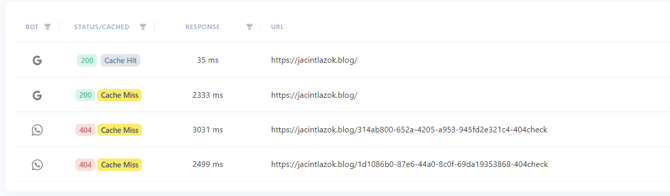
Cache hits and cache misses
The first time Prerender.io renders and stores a page, that request is a cache miss — the page wasn't in the cache yet, so Prerender.io had to render it. This takes a moment longer than a cached response.
Every request after that is a cache hit — Prerender.io serves the stored HTML instantly, with no rendering delay.
The goal is to have as many cache hits as possible. A high cache miss rate means AI crawlers and search engines are frequently waiting for pages to render on the fly.
How to reduce cache misses
If you're seeing a high volume of cache misses, there are three approaches to address it.
Add a sitemap
A sitemap tells Prerender.io which URLs exist on your site, allowing it to pre-render pages before AI crawlers request them. This converts what would have been cache misses into cache hits. See How to use Prerender.io's sitemap for setup instructions.
Ensure your server returns 200 for pages you want cached
Only pages with a 200 response are stored in the cache. If your server is returning non-200 codes for pages you expect to be cached, investigate your server configuration — a 404 or redirect on a page that should be live will never accumulate cache hits.
Use the Recache API to cache pages proactively
The Recache API lets you trigger renders and cache pages before AI crawlers request them. This is useful for high-priority pages or after publishing new content. See What can I do with the Prerender.io REST API? for details.
💬 Still need help?
If you have questions about caching behaviour or cache miss rates in your account, our support team can help.
→ Contact us at support@prerender.io