
TL;DR
Prerender.io stores your rendering analytics for two years, and your plan decides how much of that history you can view: 60 days on Starter, six months on Growth, and the full two years on Pro and Enterprise. Upgrading unlocks the longer view immediately, because the data was stored all along.
Storage and visibility are two different things
Two separate limits apply to your analytics data, and it helps to keep them apart.
-
Storage is how long Prerender.io keeps the data. That is two years, on every plan.
-
Visibility is how far back you can look in your Prerender.io dashboard. That depends on your plan.
The practical effect is that upgrading unlocks history you could not see before. If you are on Starter on day 200 and move to Growth, your next dashboard load shows the full six months, with no waiting period. Nothing was deleted at 60 days, it was simply outside your view.
| Plan | Visible history | Stored |
|---|---|---|
| Starter | 60 days | 2 years |
| Growth | 6 months | 2 years |
| Pro | 2 years | 2 years |
| Enterprise | 2 years | 2 years |
ℹ️ Our pricing page lists this row as "Data Retention". It describes the visible history window for each plan, which is the column above on the left. Your data is stored for two years regardless of which plan you are on.
You can check your current plan under Billing and account in your Prerender.io dashboard.
What Prerender.io keeps, and for how long
Different kinds of data serve different purposes, so they are kept for different lengths of time.
| What it is | How long it is kept |
|---|---|
| Rendering analytics: render counts, crawler activity, cache performance | 2 years |
| Cached pages: the rendered HTML served to crawlers | Follows your own cache expiration setting |
| Usage records used to calculate your bill | 13 months |
| Invoices and payment records | Up to 10 years, to meet the tax and accounting obligations that apply to us |
| Support conversations with our team | 3 years from the date the conversation is closed |
| Your account details | Deleted within 180 days of account closure |
ℹ️ Aggregated statistics that cannot be traced back to you or your domains are kept without a time limit. They are no longer personal data, and they are what we use to understand how crawler behavior is changing across the web.
Cached pages follow your own settings
Cached pages work differently from analytics, because you control them directly.
Your cache expiration setting decides how long Prerender.io keeps a rendered page before refreshing it. Prerender.io refreshes cached pages automatically on a schedule based on that setting, rather than waiting for a crawler to ask for the page again.
The range available to you depends on your plan.
| Plan | Cache expiration range |
|---|---|
| Starter | 24 hours to 7 days |
| Growth | 12 hours to 14 days |
| Pro | 6 hours to 30 days |
| Enterprise | 6 hours to 30 days |
If you clear your cache, remove a URL, or close your account, the cached pages are purged within 30 days.
ℹ️ Cache expiration is worth matching to your publishing rhythm rather than setting as low as it will go. Refreshing pages more often than your content changes does not change what AI crawlers and search engines see, and it uses up renders.
What changes in Deep Insights on 10 October 2026.
From 10 October 2026, Deep Insights shows the most recent two years, in line with the rest of your Prerender.io dashboard. History older than two years is deleted rather than hidden, so it cannot be restored later by upgrading.
If your account is less than two years old, nothing changes for you. Nothing changes in the retention periods published on our pricing page either.
⚠️ If your account is more than two years old, export your Deep Insights history before 10 October 2026 if you want to keep the earlier period. Unlike the plan visibility limits described above, this data is removed permanently.
How to export your Deep Insights history
Open Deep Insights in your Prerender.io dashboard and select Export. Prerender.io generates a CSV of your historical data, which you can open in any spreadsheet application.
The export covers aggregated data: totals and trends over time, rather than raw per-request logs. It is a record of how your site has performed, not a replay of individual crawler visits.
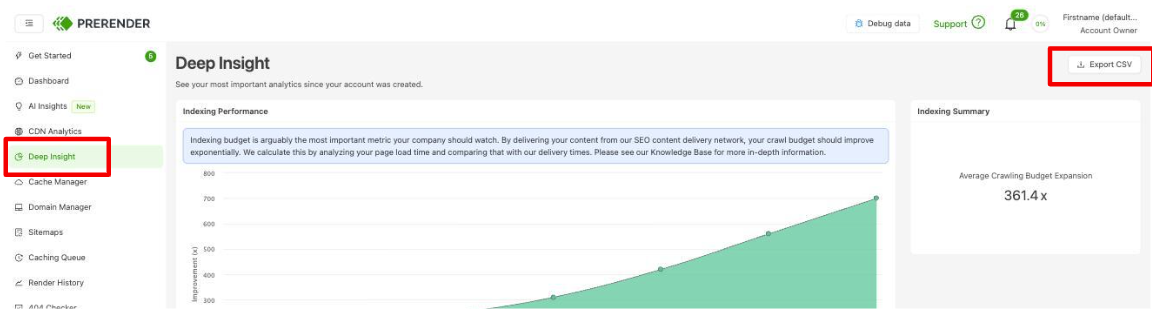
✅ Your export worked when the downloaded CSV opens with one row per time period and columns for your render and crawler metrics.
Data retention for security and compliance reviews
If you are evaluating Prerender.io as part of a vendor assessment, the periods above are the ones that apply to customer data in our production systems.
Our roles as processor and controller across each category of data are set out in our Data Processing Agreement, which governs in the event of any difference from the summary on this page.
Deletion runs automatically on the schedules above. You can also request earlier deletion of your data as a data subject request, described in the FAQ below. Deletion propagates to our backups, and we will confirm the current backup retention period on request.
ℹ️ For more information you can visit https://prerender.io/privacy-and-terms/
For a documented answer covering a specific data category, jurisdiction, or subprocessor, contact us and we will provide it.
Frequently asked questions
Will I lose data if I downgrade my plan? Your visible window shrinks to match your new plan, but the data is still stored for the full two years. Moving back up restores the longer view.
Does this affect my cached pages or my rendering? No. The two-year period applies to your analytics history. Your cached pages follow your own cache expiration setting, and crawler requests are served exactly as before.
Can I ask for my data to be deleted sooner? Yes. Contact us and we will handle it as a data subject request.
💬 Still need help? If you have questions about what Prerender.io stores, how long it is kept, or how to export your history, our support team can help. → Contact us at support@prerender.io