
TL;DR
AI Insights tells you every day whether AI crawlers like GPTBot, ClaudeBot, AmazonBot, and PerplexityBot can access your site, and what to do when they can't. A daily status banner summarizes your AI discoverability health so you don't have to interpret charts yourself. The Discoverability tab shows how much of your site AI crawlers are reaching and gives you a prioritized list of pages to fix. The Diagnostics tab checks your integration, robots.txt file, CDN, and firewall for each crawler and gives you step-by-step fixes, plus a report you can share with your dev team.
Why this matters
If AI crawlers can't reach your pages, or get errors when they try, your content won't appear in AI-generated answers. These failures are usually silent: nothing looks broken on your site, and you only notice weeks later when citations drop.
AI Insights surfaces these problems early, a missing crawler, a blocked page, a misconfigured robots.txt file, and tells you which ones to fix first.
Where to find it
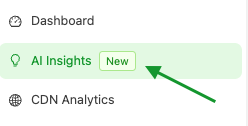
Open your Prerender.io dashboard and select AI Insights from the left navigation. Inside, you'll find two tabs: Discoverability and Diagnostics.
Your daily discoverability status
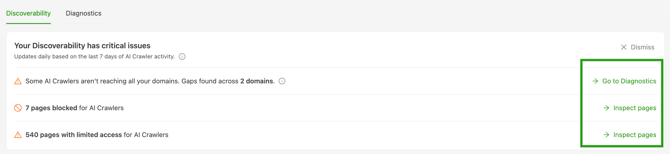
At the top of AI Insights, a status banner gives you a one-glance answer to "where do I stand?" It's updated automatically every day based on your last 7 days of crawler activity, and shows one of three states:
Critical: Crawlers missing for the last 7 days, or pages fully blocking AI crawlers. Start here.
Needs improvement: Some pages are limiting crawler access, but nothing is fully blocked.
Healthy: AI crawlers are accessing your site without issues.
Select Inspect pages from the banner to jump straight to the affected pages, or Run Diagnostics to see where access is blocked. Inspect pages filters the dashboard to the same window used to calculate your discoverability status.
Discoverability: track AI crawler activity over time
The Discoverability tab shows how AI crawlers are reaching your site, so you can catch access problems as they happen instead of weeks later.
Tracked AI crawlers
AI Insights tracks AI crawlers from four AI platforms: ChatGPT (GPTBot), Claude (ClaudeBot), Amazon (AmazonBot), and Perplexity AI (PerplexityBot). For the full list of bots Prerender.io recognizes across your account, see list of bots Prerender.io can recognize and classify.
Export the dashboard and toggle chart descriptions
Next to the domain, crawler, and date range filters, select the ⋮ menu to control how you view and share your Discoverability data.
Export as PDF. Export the current Discoverability view as a PDF. Use it to share your AI visibility performance with your management team or clients.
Chart Descriptions. Turn the text description under each chart on or off.
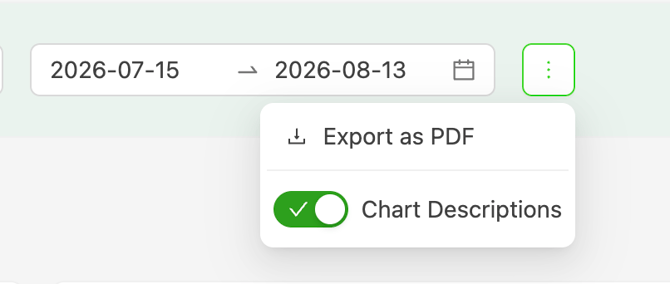
Export as PDF, Chart Descriptions, and the Pages to Review CSV export below are available to any account with AI Insights enabled, on every plan except legacy plans.
Summary metrics (KPIs)
Three KPI cards give you a quick read on your site's AI crawler health:
AI Crawlers detected. How many of the four tracked crawlers visited your site during the selected period (for example, 2/4), with a tag naming any that haven't shown up. A crawler that stops visiting is an early signal worth investigating: run Diagnostics to check if it's blocked.
Pages Crawled. The number of unique pages AI crawlers have visited. This is your crawl depth: if you have 2,000 pages and crawlers only reach your homepage, AI platforms have very little of your content to draw from. Watch this number grow to confirm crawlers are discovering more of your site, including the pages that matter most to you.
Error rate. The percentage of AI crawler requests that returned a 5xx error instead of a served page. A rising error rate usually points to pages failing when crawlers request them.
Each KPI shows the trend against the previous period.

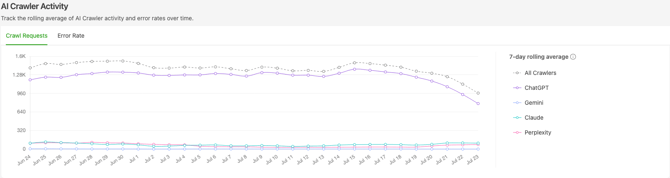
Crawler activity chart
The activity chart tracks crawl requests and error rates per crawler over time. A sustained drop in a crawler's activity can signal an access problem, or that your site is being deprioritized, often before you'd notice it anywhere else.
Pages to review: what to fix first
This table turns crawler activity into a prioritized fix list. Pages are organized into three tabs by severity:
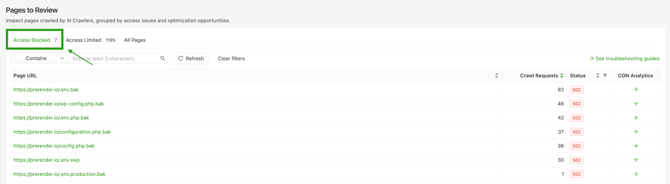
Access blocked. Pages returning critical errors, such as 429, 500, 502, 503, and 504, that stop a crawler from reading the page at all. Fix these first.
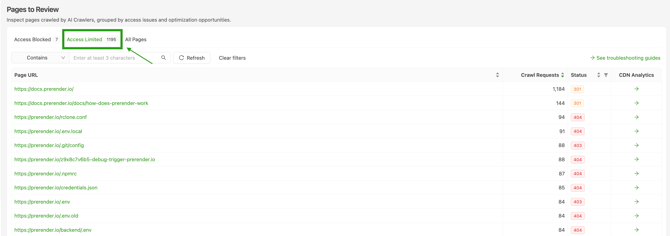
Access limited. Pages returning redirects or client errors, such as 301, 404, and 403, that may prevent a crawler from reaching your intended content. Fix these next.
All pages. Every page an AI crawler requested during the selected period.
Within each tab, pages are sorted by crawl requests, so the pages at the top are the ones AI crawlers want most.
Export Pages to Review as a CSV
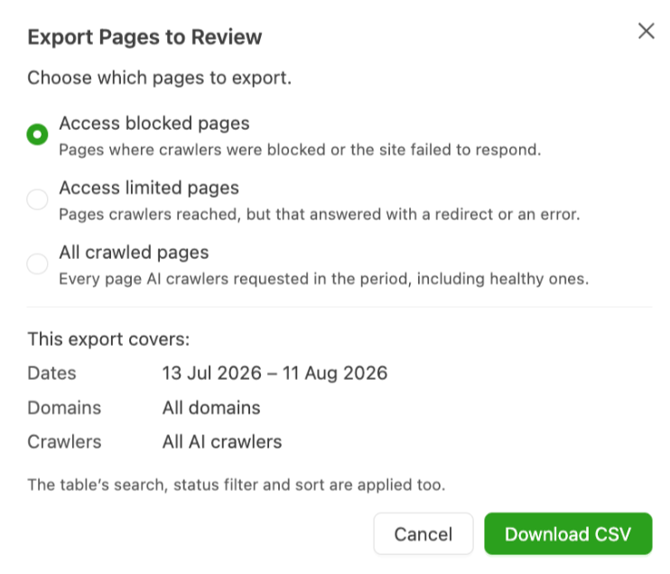
Open the Export Pages to Review dialog above the table to download your fix list as a CSV, separately from the dashboard PDF export. Choose which pages to include: Access blocked pages, Access limited pages, or All crawled pages, matching the table's three tabs. The dialog summarizes the date range, domains, and crawlers your export covers, and applies whatever search, status filter, and sort you've already set on the table. Select Download CSV to save the file.
Pages to Review exports cover up to 30 days of data at a time.
Status report in your inbox
Prerender.io emails you a biweekly AI discoverability status report based on your daily status, so you always know where you stand, even if you haven't logged into the dashboard. You can manage this in your email preferences.
Diagnostics: find out exactly where a crawler is blocked
While Discoverability shows what's already happened, Diagnostics lets you test your setup right now. It's the fastest way to answer "is my site blocking AI crawlers?"
Diagnostics verifies AI crawlers aren't blocked in your Prerender.io integration, robots.txt file, CDN, or firewall configuration. It checks access by simulating requests from four training bots: GPTBot, ClaudeBot, AmazonBot, and PerplexityBot. Other bots, such as user-triggered fetchers like ChatGPT-User and search crawlers like OAI-SearchBot, may have different access and should be checked separately.
If any of the four tracked crawlers hasn't visited your site in the last 7 days, AI Insights flags it and prompts you to run diagnostics for the affected domain.
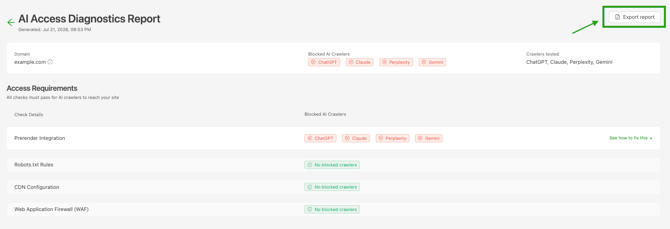
Each diagnostics run checks the four most common causes of blocked crawler access, per crawler:
- Integration check. Confirms the crawler's user agent is included in your Prerender.io integration. If it's missing, Prerender.io can't serve that crawler rendered pages or detect its visits.
robots.txtcheck. Confirms yourrobots.txtfile allows the crawler's user agent.- CDN check. Confirms your CDN isn't blocking the crawler.
- WAF check. Confirms your web application firewall isn't blocking the crawler's requests.
Each check returns a pass, fail, or error result per crawler. For every failed check, the report includes step-by-step instructions to fix it, including the exact user agents to add to your integration or robots.txt file.
Once you've made the fixes, re-run Diagnostics to confirm access is restored, then monitor the crawler activity chart to see if the crawler returns.
Sharing the report. You can export the full diagnostics report as a PDF to share with your development team.
Ready to see AI Insights in action? Watch the demo video of this feature below:
Related articles
💬 Still need help? If you have questions about your AI Insights data, a diagnostics result, or how to fix a blocked page, our support team can help. → Contact us at support@prerender.io